

Lucky Nugget Casino Contact & Live Chat
Live chat is open around the clock; here is how to reach it and what to send.

How to Contact Lucky Nugget Casino From New Zealand
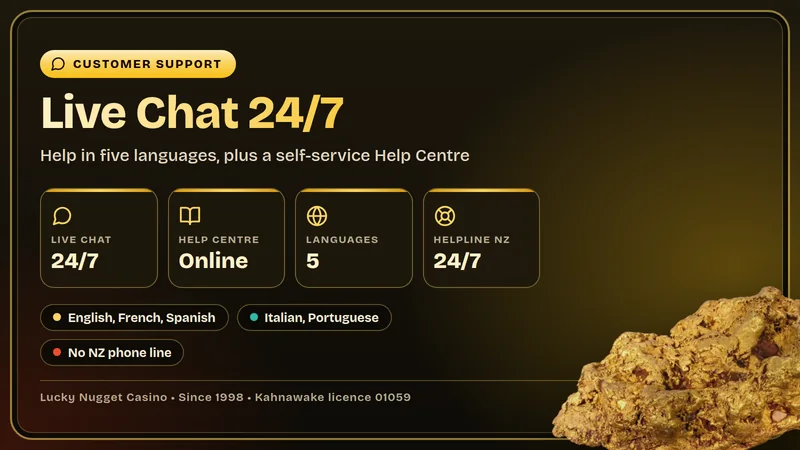
The quickest way to reach a person at Lucky Nugget Casino is live chat, and it is open 24 hours a day, every day. A player in New Zealand does not need to wait for office hours, and there is no need to guess which department handles the question: the agent in the chat sees your account and sorts it out. For anything that is a matter of "how does this work", the Help Centre sits next to it as a self-service library, so you can read the answer yourself in a minute instead of typing it into a chat window.
One thing that surprises people used to older casino sites: there is no phone number for New Zealand. None is published, so you will not find one here either. Live chat takes that role, and in practice it is faster than waiting on a line, because you can paste a transaction time, attach details and scroll back through what was said. If you were looking for "contact Lucky Nugget NZ" because you want a number to ring, the chat is the replacement, and the sections below show how to make good use of it.
Why chat suits players in New Zealand
New Zealand sits on the edge of the time zones that most casino support desks think in, and a phone line that works nine to five in another country is of little use to someone playing after dinner. A 24/7 chat removes the problem. You write when it suits you, whether that is a quiet Sunday morning in Wellington or a late evening in Auckland, and you get a written record that both sides can check. For money matters in particular, a record is an advantage: the time of a request, the amount and the answer you were given are all in one place.
It also keeps things private. Nobody around you hears what you are asking, and you can reply between other tasks without staying on hold. Players who search for the Lucky Nugget Casino live chat on a phone can use the same route from the iPhone app or from the browser on an Android phone, since the account and the support options are the same on every device.
Five languages, one team
Lucky Nugget customer service works in English, French, Spanish, Italian and Portuguese. For most readers of this guide that means English, but it is useful to know the choice exists: if you are more comfortable writing in another of the five, say so in your first line and write in that language. Clear sentences in any language beat long ones, so keep the message short and put the facts in a list.
What each channel is for
- Live chat: any issue linked to your account, for example a withdrawal, a deposit that did not arrive, a bonus step or a verification question.
- Help Centre: general explanations about payments, bonuses and account checks that you can read at your own pace.
- Account tools: deposit limits, session reminders, time-out and self-exclusion, which you control yourself.
- Gambling Helpline NZ: free and confidential help if gambling is causing worry, on 0800 654 655, any time.
That is the whole contact map for a New Zealand player. A new account does not change it, whether you have just opened one for the NZ$1 first step of the welcome package or you have been collecting loyalty points for years. If you have not signed up yet and want the details of the offer first, our promo code guide explains it, and the button below takes you to the casino.
How to Open Lucky Nugget Live Chat, Step by Step
Here is the route from the lobby to an actual conversation. The panel below is a drawn walkthrough, not a screenshot, so the colours and wording on your own screen will differ a little. It simply shows the order in which things happen. Tap a step on the left to see what that stage looks like.
Opening Live Chat, Step by Step
Open the casino in your browser or in the iPhone app and sign in with your own details.
Look for the Help entry in the menu of the site or the app.
From the Help area, choose the live chat option.
Write one clear message with the facts an agent will ask for anyway.
The answer arrives in the same window, and you can scroll back through it.
If you prefer text to a widget, the same route in writing looks like this:
- 1Log in first. Chat from inside your account is the smoothest option because the agent can match you to your records without long identity questions.
- 2Open Help. The Help area is where the support options and the Help Centre articles live, on the website and in the iPhone app.
- 3Choose Live Chat. Pick the chat option rather than reading articles when you need a person to look at your account.
- 4Describe the issue in one message. Name the topic, the date and time, the amount and the payment method, and say what you would like to happen.
- 5Read the reply and save it. Take a screenshot of anything that contains a decision or a time frame, so you can refer back to it later.
Writing a first message that gets a fast answer
An agent in a 24/7 chat handles many conversations in a shift, and the first message sets the tone for the rest. A good opener is short, factual and complete. Compare the two versions: "my money is not there, help" forces three or four questions before anyone can look at anything, while "I deposited NZ$20 by Apple Pay at about 7 pm today and the balance did not change" lets the agent start checking straight away.
- State the topic in the first line: withdrawal, deposit, bonus, verification or login.
- Give the date, the approximate time and the amount in NZ$.
- Name the payment method, such as Visa, ecoPayz or Neosurf.
- Copy any error message exactly as it appears on screen.
- Say which result you want: a check, a correction, a document review or an explanation.
- Never type your password, your whole card number or the three-digit code from the back of a card into the chat.
- Do not send several half-messages in a row; one complete message is easier to answer.
Tip: Stay in the chat window while you wait for the reply, and save the transcript or a screenshot before you close it, so the details are on hand if you need to follow up.
What to Do If Live Chat Does Not Work
Most of the time the chat simply opens. Now and then it does not: the window stays blank, the button does nothing, or the connection drops halfway through a message. These problems nearly always come from the device or the connection, not from the support team, and they are usually fixed in a few minutes. Work through the list in order, from the easiest fix to the most thorough.
Quick fixes for a chat window that will not load
- 1Check the connection. Switch between Wi-Fi and mobile data, or move closer to the router. A weak signal is the most common reason for a chat that opens and then goes quiet.
- 2Reload the page. Refresh the browser tab or close and reopen the iPhone app, then go back to Help and start the chat again.
- 3Turn off blockers for the page. Ad blockers, strict privacy extensions and some VPN settings can stop a chat widget from appearing. Pause them for the casino and try again.
- 4Try another browser or device. Android, Windows, macOS and Chrome OS play in the browser, and iPhone and iPad users can also use the app. If one route fails, another often works.
- 5Update the app or the browser. The iOS app needs iOS 14 or later, and an old browser version can break scripts that a chat window relies on.
- 6Clear the cache. Cleared cookies and cached files remove stale data. Log in again afterwards.
If you are logged out or cannot get in
Locked-out players are in the awkward position of needing help to reach help. The Help Centre articles on login problems are the first stop: they explain the usual causes, such as a mistyped password, a changed device or a browser that has saved old details, and the steps for each. Look for the forgotten-password option on the login form, and make sure you use the same details you registered with. After a few failed attempts it is wiser to stop and read the guide than to keep guessing, because a calm look at the steps is quicker than another round of trial and error.
Chat from outside the account works best when you have one clear piece of information to give: your username, the date you registered, or a recent deposit with its amount and method. Write what happens on the screen when you try to sign in, word for word.
App and browser tips
The iPhone and iPad app is a good place to start for chat on the move, because you stay signed in and the Help area is a tap away. On Android, Windows, macOS and Chrome OS the casino runs in the browser, and the support options are the same there. A few small habits prevent most chat problems. Keep one tab open for the casino rather than several, so the session is not confused. Let the page finish loading before you tap anything. If your phone saves battery by pausing background apps, stay on the chat screen until the answer arrives, because a paused app can lose its connection and you would only find out when you look again.
Use the Help Centre while you wait
The Help Centre does not depend on an agent, so it is available the moment the chat is not. It holds articles on payments, bonuses, withdrawals and the identity check, and a search often turns up the exact page. It is particularly good for "how long", "how much" and "how do I" questions, where the answer is the same for every player and no one needs to look at your account. If you only need to know how the welcome package is claimed, or how long a Visa payout takes, reading is quicker than typing, and the NZD account guide on this site covers the money side as well.
Good to know: Support will never need your password. If anyone, in chat or elsewhere, asks for it or for a full card number, stop and report it.
When an answer leaves you unsatisfied
Sometimes the chat works perfectly and you still disagree with the outcome. There is a calm, orderly route for that, and it begins with the casino itself.
- Step 1 - raise it in live chatSay that you want to make a complaint, give the facts in order, and ask what the agent can see on the account. Save the transcript.
- Step 2 - ask for it to be escalatedIf the first answer does not settle things, ask the agent to pass the case to a senior colleague and note the time you asked.
- Step 3 - use the regulator's processThe Kahnawake Gaming Commission, which licenses Lucky Nugget Casino, sets out a dispute resolution process on its website. It asks that the issue be raised with the operator first, and its online form wants basic details such as your name, country, the site, your username, the date of the matter and a description.
Keep the tone factual all the way through. Complaints that read as a clear timeline with amounts and dates are the easiest to review, and the Commission notes that a matter already discussed on a public forum or passed to the media may not be taken up, so it is sensible to finish the formal route before posting anywhere.
Common Problems and What to Send Support
Most contacts fall into six groups. For each one below there is a short note on what is going on and, more usefully, a list of what to put in your first chat message. Having the facts ready turns a long exchange into a short one.
Account verification
The first withdrawal needs an identity check: a photo ID plus a proof of address, and the team can ask for source of funds where the case calls for it. This is a normal step at a licensed casino, and it is easiest when done before you ask for a payout.
- Clear photo of your ID, all corners visible
- Proof of address with your name and address
- The name must match your account details
- Ask in chat which documents are accepted
Withdrawal still pending
Each request waits in pending for 24 hours, and while it waits you can cancel it yourself. Nothing is processed at weekends, and after the pending time the method sets the speed: 1-3 business days for Visa, 24-48 hours for ecoPayz and Neosurf. See the withdrawal times page for the details.
- Username and payment method
- Amount and date of the request
- Whether verification is already approved
Bonus not credited
The welcome package has three steps (NZ$1, then NZ$5, then NZ$5), each tied to a qualifying deposit made in the first 7 days after the account is opened. No promo code is used. The daily Mega Millionaire Wheel needs a first deposit of NZ$10 or more.
- Which offer step you expected
- Deposit amount, method and time
- Date you registered
Login trouble
Locked out, a forgotten password or a screen that will not accept your details. Read the Help Centre login articles first, then write to support with what you see.
- Username and registration date
- Device and browser, or the iPhone app
- The exact message shown on screen
- Never the password itself
Deposit did not arrive
Deposits start from NZ$5, apart from the NZ$1 first welcome step. Visa, Mastercard, Skrill 1-Tap, Neteller, paysafecard, Apple Pay, Google Pay, ecoPayz and Neosurf are listed in the cashier, and a bank can also decline a card payment on its side.
- Method, amount and time of the attempt
- Any error message, word for word
- Last four digits of a card, never the full number
Limits and self-exclusion
Your account has deposit limits, session reminders, a time-out and self-exclusion, and you can switch any of them on whenever you like. If you cannot find a tool or want a hand setting it up, chat is the place to ask. Free help is also on the line at Gambling Helpline NZ, 0800 654 655.
- The tool you want to use
- Your username
- Say if you want to stop completely
Who actually solves what
It helps to know what the agent in chat can look at and what stays with other parts of the process. The agent can look at your account details and the history behind your question. Payment methods carry their own timings, so a pending card payout is explained by the schedule rather than fixed on the spot. Verification documents go through a review, which takes a little time, and a bonus step either matches the terms of the offer or it does not, in which case the agent can explain the rule that applied. Knowing this makes the answers easier to read: "it is within the normal time" is an answer too, and it comes with a date to check back on.
Tip: Ask for the next step and a date in every conversation, for example "when should I expect this to be completed?". It gives you something concrete to refer back to if you need to follow up.
Questions about bonuses and wagering
Plenty of chat traffic concerns the 200x wagering that applies to bonus money as well as free-spin winnings. A few facts help before you write in. While a bonus is active, withdrawals are capped at six times the first deposit, and progressive jackpot wins are not included in that cap. The maximum bet with a bonus is 50c per line, and the terms add a cap per spin as well. A match bonus left unused lapses after two months, and requesting a withdrawal ends an active match bonus. Most of that is on the promo code page in more detail, and an agent will confirm how it applies to your particular balance.
Live Chat, Help Centre or Helpline: Which One to Use
Four routes cover everything a player in New Zealand may need. They are not rivals: each fits a different kind of question, and the right choice saves time. The table puts them side by side.
| Channel | Best for | Hours | Response |
|---|---|---|---|
| Live chat | Account issues | 24/7 | Real time |
| Help Centre | How-to guides | 24/7 | Instant |
| Account tools | Limits, time-out | 24/7 | Instant |
| Gambling Helpline NZ | Gambling worries | 24/7 | Immediate |
Live chat and the Help Centre are the two you will use most. The Help Centre answers the question that every player has in common, such as how long a payout takes by method or which documents verification needs. Live chat answers the question that only your account can answer, such as where a particular payment is right now. The account tools are not a conversation at all, they are switches you control, and the helpline is for the human side of gambling rather than the casino's systems.
Picking a channel by situation
Go to live chat when
- a payment is missing or late
- a bonus step did not appear
- documents need a review
- you want to complain
Open the Help Centre when
- you want to know how a rule works
- you need the list of documents
- you are planning a deposit
- chat is busy or not loading
Call the helpline when
- you are spending more than planned
- you feel pressure to chase losses
- gambling affects family or work
- you simply want to talk it through
Myth and fact about support without a phone line
Responsible gambling is part of support
Looking after your play is as much a part of the service as paying out. The account tools let you set deposit limits, session reminders, a time-out or self-exclusion, and support can walk you through them. Outside the casino, Gambling Helpline NZ, on 0800 654 655, costs nothing and is staffed day and night, and the Problem Gambling Foundation (pgf.nz) is another New Zealand source of help. Gambling is only for adults of 18 or older, and it should remain a form of entertainment, not a way to earn money.
For the background of the site and where its facts come from, see the about page, which also explains how the dates on each page are set.
Contact Questions
Brief replies to the questions New Zealand players raise most about getting in touch with Lucky Nugget support.
Yes. The support team answers in live chat at any hour, so a question at 3 am New Zealand time gets the same channel as one at lunchtime. Your own sign-in matters more than the clock: chat is easiest to use when you are logged in, because the agent can see which account you mean.
Busy periods can mean a short wait in the queue. If you send the full details in your first message, the agent does not have to ask for them one by one, and that is usually the fastest route to an answer.
No New Zealand phone line is published, so this guide does not print one. For a player in Aotearoa the practical route is the live chat, available at every hour, together with the Help Centre for self-service answers.
If a website or message gives you a number and says it belongs to Lucky Nugget support, treat it with caution and go back to the chat inside your account instead.
Support works in five languages:
- English
- French
- Spanish
- Italian
- Portuguese
New Zealand players will normally pick English, but if another of these languages is easier for you, write in it and the team can answer accordingly.
The Help Centre is the self-service library behind the Help area of the casino. It holds step-by-step articles on deposits, bonuses, withdrawals and account verification, and it is open at any time because nobody has to answer you live. Searching it first often saves a trip to chat, especially for questions about how an offer works.
Give the agent four things in one message:
- your username
- the payment method used for the withdrawal
- how much you asked for and when you asked
- whether your ID and address documents were already approved
Remember that every request waits 24 hours in pending, that you can cancel it while it waits, and that nothing is processed at weekends. Our withdrawal times guide has the full timetable by method.
Start with live chat and say plainly that you want to make a complaint, then keep the chat transcript or a screenshot. If the answer does not settle the matter, ask the agent to escalate it. The licence of the casino comes from the Kahnawake Gaming Commission, whose website describes a dispute resolution process; it asks you to take the issue to the operator first.
Gambling Helpline NZ takes calls on 0800 654 655 at no cost, in confidence and at any hour, and the Problem Gambling Foundation (pgf.nz) offers support as well. In your account you can switch on deposit limits, session reminders, a time-out or self-exclusion whenever you like, and live chat can point you to those tools if you cannot find them.


Play Knowing Help Is Always Open
Live chat runs around the clock at Lucky Nugget Casino, and the welcome package starts with 40 spins for NZ$1. Open your account and keep this page handy.